 FreeLLM
How to use the Claude SEO plugin on your site, and how to check its report
Install the free Claude SEO plugin for Claude Code, check one page and verify the report. Every command, the Windows error we hit, and what the report got wrong.
Claude SEO is a free plugin for Claude Code. It reads a page of your website and tells you what could stop search engines from finding it.
This guide shows every step on Windows, what should appear on screen, and what happened when we ran it on our own home page on 1 November 2026, with plugin version 2.5.0 and Claude Code 2.1.280.
In short
- The plugin is free under the MIT license. Claude Code needs a paid Claude plan or API credit, and every check uses that allowance.
- The first setup took 2 minutes 14 seconds, and about 1.3 GB of disk.
- One page took about 2 minutes.
- Our home page scored 85/100 with the plugin tools, and 82/100 when Claude checked it by hand.
- The report found a real redirect problem, but it was wrong about our sitemap. Check every finding yourself.
- We did not run the full site audit, and speed was not measured.
Before you start
You need Claude Code version 1.0.33 or newer, and Python 3.11 to 3.14. Use a website that is yours.
Claude Code plugins run on your computer. Claude Code warns that Anthropic does not control what a plugin contains, so install only from sources you trust.
Step 1: Open the official page
Go to the Claude SEO repository on GitHub. On the day we tested it had about 25,000 stars. Stars show that many people follow a project, not that it is safe.
Step 2: Add the marketplace
Open PowerShell, go to your project folder, type claude and press Enter. Inside Claude Code, run this command. A marketplace is just a list of plugins.
/plugin marketplace add AgriciDaniel/claude-seo
You should read: Successfully added marketplace.
Step 3: Install the plugin
/plugin install claude-seo@agricidaniel-claude-seo
Claude Code shows the details and the warning. Then it asks where to install. For most people the first option is right, because it works in all your projects. We chose the local option so that our test stayed inside one folder.
You should read: Installed claude-seo. Plugin is now active.
Step 4: Run the first setup
/seo setup
It builds its own private copy of Python, and it installs Chromium, a browser it uses to open pages. We typed the longer name /claude-seo:seo setup, because our PC already had an old copy with the same command. On a clean install, the short command is enough.
Step 5: Fix the not ready error
Close Claude Code, open it again, then run this.
/seo doctor
If it says ready, go to step 6.
On our Windows PC it said not ready, even though setup had just finished. It told us to run setup again. Do not do that yet. Setup had worked, and the plugin was simply looking in the wrong folder.
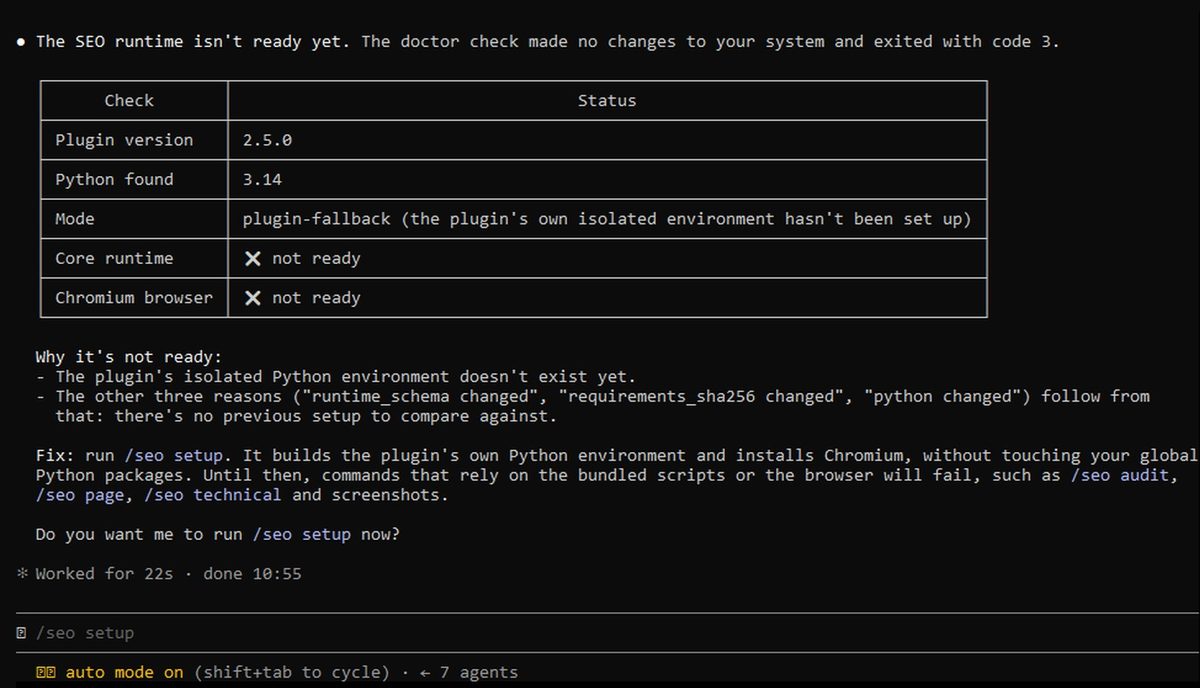
Type /exit to leave Claude Code. In PowerShell, paste this line, then type claude again.
$env:CLAUDE_SEO_DATA_DIR = "$HOME\.claude\plugins\data\claude-seo-agricidaniel-claude-seo"
It tells the plugin where its setup is. It lasts only for this window, so repeat it next time. After this, doctor said ready on our PC.
This step matters. When we skipped it, the plugin still answered, but Claude did the check by hand, without the plugin tools.
Step 6: Check one page
/seo page https://your-site.com
It only read our page and changed nothing. At the end, the report gives a score for each area and a list of problems, with the most important first.
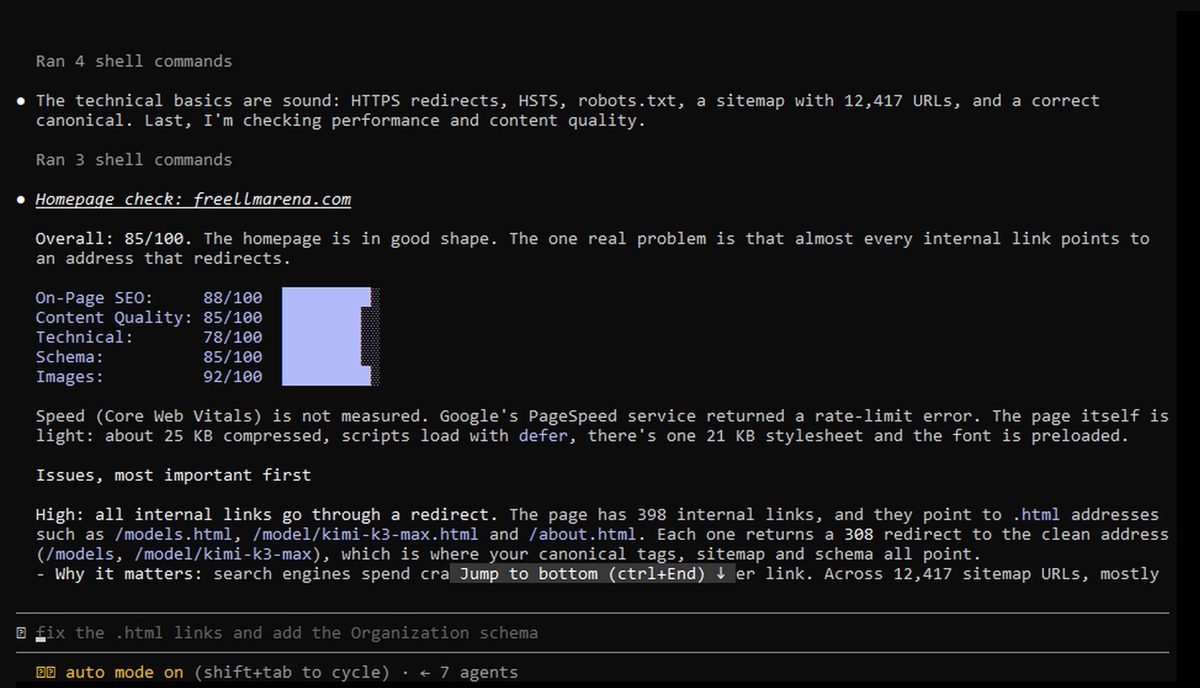
Our report said speed was not measured, because Google PageSpeed answered with a rate limit error. So the score says nothing about how fast our page really is.
Step 7: Check the report yourself
The top problem was about redirects. Many links on our home page end in .html, and each one sends you on to the clean address. A redirect is a small detour that search engines have to follow.
In PowerShell, this command asks your site about one address. Use one of your own addresses.
curl.exe -s -o NUL -w "%{http_code} %{redirect_url}\n" https://your-site.com/some-page.html
We got 308, a redirect, so that finding was real.
But the same report said our sitemap pointed to the clean addresses. A sitemap is the list of pages you give to Google. So we counted.
$sitemap = curl.exe -s https://your-site.com/sitemap.xml | Out-String
([regex]::Matches($sitemap, "<loc>")).Count
([regex]::Matches($sitemap, "\.html</loc>")).Count

Our sitemap had 12,417 addresses, and 6,013 of them ended in .html. We tested 50 at random, and all 50 redirected. So the report was wrong here, and the problem was bigger than it said.
Same page, two scores
| Run | Pontuação |
|---|---|
| With the plugin tools | 85/100 |
| Claude by hand, tools not ready | 82/100 |
The lists were different too. The run by hand found that our Italian home page still had an English title. The run with the tools did not mention it. We checked, and the title was in English.
So a score is a rough guide, not a measurement. Read the list, and check each item.
What we did not test
- The full audit. The command is
/seo audit https://your-site.com. The official page says it takes 10 to 15 minutes. We did not run it, because it uses much more of your plan. - Speed. Without Google API keys, the official page says Core Web Vitals are lab estimates and indexing is inferred from the page. We did not add any keys.
- Other systems. We tested on Windows only.
Step 8: Remove it cleanly
/plugin uninstall claude-seo@agricidaniel-claude-seo
Claude Code asks about the plugin data, 1.3 GB on our PC. Press Y to delete it. If you press another key, that space stays on your disk. Then remove the marketplace.
/plugin marketplace remove agricidaniel-claude-seo
You should read: Removed 1 marketplace.
Limits to know
- Both our reports ended with links to the author's community. You do not need them for the plugin.
- The grey text in the input box is only a suggestion. Check your site first, and keep a backup before you let anything change your code.
- A plugin report can change between runs, so do not treat it as a final answer.
If you want more free AI tools you can run yourself, our Ollama guide shows how to run a model on your own computer.
Is Kimi K3 (Max) the right model for you?
See every free model ranked by blind human votes, with size, memory and speed on a home GPU.